You can define program options in the Options dialog box. To open the Options dialogbox, use the Options  button from the Program settings toolbar.
The Options dialog includes the following sections:
Maximum number of videos for simultaneous converting
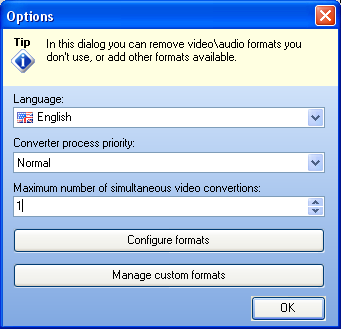
Language. In the Language box you can select the program interface language from the corresponding lists.
Converter process priority. Select converter process priority you want. Please note, setting it to "Above normal" or "High" will make your computer reacts slower.
Maximum number of videos for simultaneous converting. The application supports simultaneous converting of multiple files, so that the files on the list could be converted as soon as possible. Up to 5 video/audio files can be converted at the same time. By default, the maximum number is set to 1 video/audio file.
NOTE: 1 or 2 simultaneously converted videos is the optimal amount of simultaneously converted videos not to affect your computer speed. Setting more than 2 videos for simultaneous converting might make your computer react slower.
Configure formats. Clicking this button opens the Select formats dialog box, where you can remove video/audio formats you do not use, or add other available formats to the Output format bar.
Manage custom formats. Clicking this button opens the New Format Wizard that will help you to create new video/audio format. Follow the on-screen instructions to Create custom format, Create custom profile for existing format, Delete custom format or Delete custom profile for specific format.